Overview
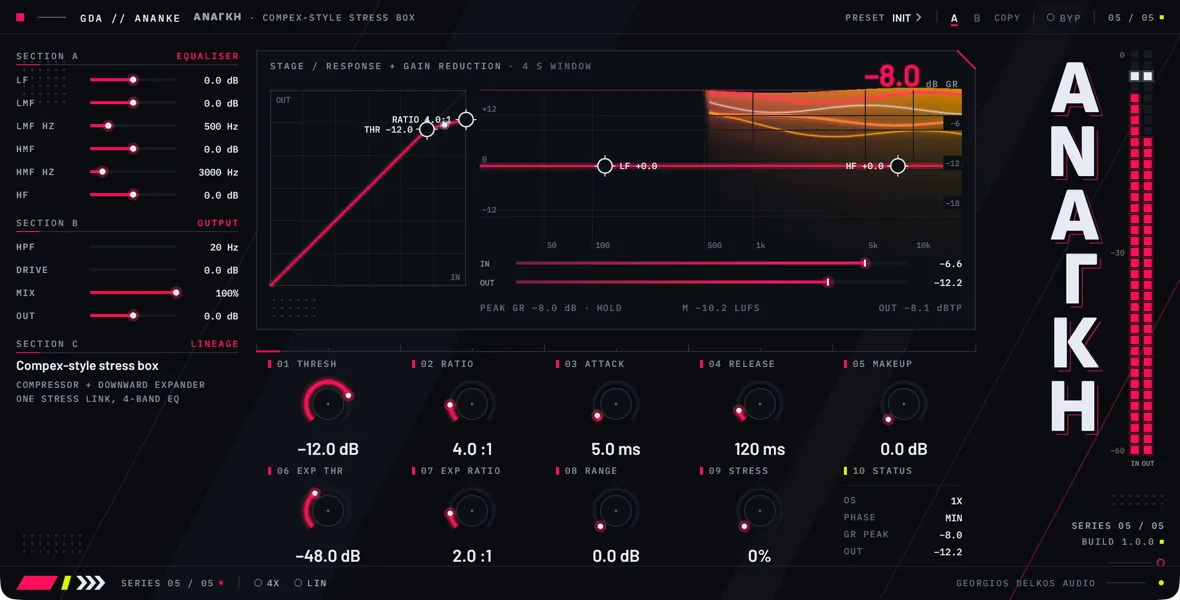
Ananke is a stereo dynamics processor for a voice, an instrument, or a bus: a compressor and a downward expander that share one gain stage, with an input high-pass filter in front of them and a four-band equalizer and a saturating drive stage around them. The compressor turns down what is loud, the expander turns down what is quiet, and Stress Link lets the first push the second. Left and right always receive the same gain reduction, so the stereo image does not move.
The compressor is a feedback design: its detector listens to the compressor’s own output, not to the input. That makes it gentler than its controls read. The compression stays under 2:1 wherever Comp Ratio is set, and how fast it sets in depends on how far over the threshold a signal arrives as well as on Comp Attack. The Comp Ratio entry gives the figures.
The expander does nothing until Exp Range is turned up. With Exp Gate off it reads the signal going into the gain stage and follows Exp Ratio. With Exp Gate on it reads the output of the gain stage, which steepens the expansion and, from an Exp Ratio of 2 upward, turns it into a gate that shuts by the whole of Exp Range and opens later than it closes. That gate starts closed.
Each of the four equalizer bands has a gain, a frequency, and a switch between a shelf and a bell. EQ Route decides where the equalizer sits: after the dynamics, before them, or only in what the compressor’s detector hears. EQ Phase swaps it for a linear-phase version, at the cost of latency.
Three things are worth knowing before you start. The drive stage is always in the processed path: with Drive at zero it still rounds off peaks that approach full scale. With 4x Oversampling off it keeps the processed signal at full scale or below ahead of Mix and Output; with it on, peaks can pass full scale, by about 2 dB on a full-scale 9 kHz sine at a Drive of 12 dB. 4x Oversampling, EQ Phase, and EQ Route make the host restart the plugin when you change them, so choose them before a pass. And the faceplate splits the controls three ways: the dynamics are the nine knobs, the equalizer, and the output controls are sliders in the column on the left, and the switches are in the footer.
Quick start
- Insert Ananke on a vocal or instrument track.
- If you want 4X or LIN, switch them on in the footer now, before you start playback: changing either makes the host restart the plugin, which can interrupt the audio for a moment.
- Loop a section that has both loud phrases and quiet gaps.
- Turn THRESH down until the large gain-reduction readout on the stage shows 3 to 6 dB on the loudest phrases.
- Turn RATIO up if the loud phrases should be held more firmly. Expect a small change: the compression stays under 2:1 across the whole control, so set the amount mainly with THRESH.
- Set ATTACK by ear: lengthen it to let consonants and the front of each note through, shorten it to hold them down.
- Set RELEASE so the ribbon on the stage, which shows the last four seconds of gain reduction, climbs back to its top edge between phrases. If no single time suits the whole take, switch AUTO on in the footer.
- Turn MAKEUP up to give back the level the compression took. It feeds the drive stage, so a large amount also adds saturation.
- Turn RANGE up to bring the expander in, then raise EXP THR until the noise between phrases drops and the words stay whole. The gain-reduction readout should rise in the gaps.
- Turn EXP RATIO up for a steeper drop below the threshold, or, with EXP RATIO at 2 or more, switch GATE on in the footer for a gate that shuts by the whole of RANGE.
- Turn STRESS up if the expander should also react when the compressor is working hard. It has an effect only once EXP THR is close under the level of the signal.
- Raise HPF, in the IN / OUT section of the column on the left, to take out rumble and plosives. It filters the audio and what the compressor and the expander hear.
- Shape the tone with the sliders of the EQUALIZER section, or drag the LF and HF handles on the response curve on the stage. Each band’s PK slider switches it between a shelf (Off) and a bell (On).
- Click the selector labeled EQ ROUTE in the footer to move the equalizer: POST puts it after the dynamics, PRE before them, and S.C. in the compressor’s detector only. A host lists this control as EQ Route.
- Turn DRIVE up for saturation. Quiet material gets louder as you do, so judge the tone and leave the loudness for OUT.
- Bring MIX down if you want to blend the unprocessed signal back in.
- Turn OUT until the level is the same with BYP (Bypass in a host’s parameter list) in and out.
- Read the status line on the stage: it shows the peak gain reduction, the momentary loudness, and the true peak of the output. The true-peak figure changes color above -1 dBTP.
Signal flow
- Input. The signal arrives and a copy is kept as the signal that Bypass passes, delayed by Ananke’s latency.
- Input high-pass. Input HPF filters the signal. Everything after this point is fed from here: the audio, both detectors and the dry side of Mix.
- Equalizer, PRE position. With EQ Route at PRE, the four bands are applied here.
- Detectors. The compressor’s detector reads the output of step 6, through the equalizer when EQ Route is at S.C. Comp Attack, Comp Release, and Auto Release set how it moves. The expander’s detector reads the signal from step 3 or, with Exp Gate on, the output of step 6. Stress Link lowers the level the expander sees by a share of the compressor’s gain reduction.
- Gain computers. Comp Threshold and Comp Ratio give the compressor’s gain reduction, and Exp Threshold, Exp Ratio, and Exp Range the expander’s. Both ease in over a fixed soft knee 6 dB wide. The two reductions are added, and the larger total of the two channels is used for both.
- Gain reduction. The total is applied to the signal from step 3.
- Peak limiter. A fixed limiter holds back anything that is still over full scale at this point. It has no controls, and its reduction is also shared by both channels.
- Make-up. Comp Makeup is applied.
- Equalizer, POST position. With EQ Route at POST, the four bands are applied here, as the linear-phase version when EQ Phase is on.
- Drive. The saturation stage, at four times the session sample rate when 4x Oversampling is on.
- Mix. The processed signal is crossfaded with the dry signal from step 2, which is delayed to match it.
- Output gain. Output is applied.
- Bypass. The Bypass crossfade is the last stage.
Latency
With 4x Oversampling and EQ Phase off, Ananke adds no latency. 4x Oversampling adds 91 samples, about 1.9 ms in a 48 kHz session. EQ Phase adds about 171 ms at any sample rate, and only while EQ Route is at POST. With both on, the two add up. Ananke reports the figure to the host so that it can compensate, and the dry side of Mix and the bypassed signal are delayed by the same amount.
The figure is fixed while the plugin is running. When you change 4x Oversampling, EQ Phase, or EQ Route, Ananke asks the host to restart it and report the new figure, which can interrupt the audio for a moment.
Meters
- IN reads the peak level of the signal as it arrives, before Input HPF.
- The large readout on the stage shows the gain reduction applied at steps 6 and 7: the compressor, the expander, and the peak limiter together. It reads zero while Ananke is bypassed.
- The ribbon hangs from the top of the field to the right of the inset and shows that gain reduction over the last four seconds, newest at the right. Its scale lines mark 6, 12, and 18 dB, and it is at full depth at 24 dB.
- The curve drawn over the ribbon is the response of the four equalizer bands as set. It is drawn from the settings, not measured from the audio, and it has the same shape wherever EQ Route puts the equalizer. With EQ Route at S.C. it is drawn dimmed and the stage caption reads DETECTOR EQ, because the audio itself is not equalized. Input HPF is not part of it. The LF and HF handles on the curve set EQ LF and EQ HF.
- The inset at the left of the stage plots output level against input level for Comp Threshold and Comp Ratio as set, with a dot at the current input level. It draws the ratio as it reads, which is steeper than the compression Ananke applies; see Comp Ratio. Its THR and RATIO handles set the two controls.
- OUT reads the peak level of the output, after Output and Bypass.
- The status line shows the peak gain reduction, held. The loudness figure is momentary loudness (a 400 ms window, in LUFS) and the true-peak figure is in dBTP. Both are measured on the output, after Output and Bypass.
- The status cell, the last in the lower row of cells, shows whether oversampling is on (1X or 4X), the EQ Route choice, the peak gain reduction, and the output level.
Controls
Top strip
- Choices
- Off, On
- Default
- Off
Takes the processing out and passes the input through, with a 10 ms crossfade so it can be automated without clicks. The bypassed signal is the input as it arrives: Input HPF and Output are not applied to it. When 4x Oversampling or the linear-phase equalizer adds latency, the bypassed signal is delayed by the same amount, so switching Bypass does not shift the audio against the rest of the session.
With neither of those in use, the compressor and the expander are emptied once the crossfade has finished. When processing returns, the compressor starts again from no gain reduction and the expander starts closed. With Exp Gate off it opens again within a few milliseconds, under the crossfade. With Exp Gate on and Exp Ratio above 2 it stays shut until the signal is far enough over Exp Threshold to open it; see Exp Gate. With either source of latency in use, both keep running underneath and carry on where they are.
The gain-reduction readout shows zero while Ananke is bypassed. On the faceplate this is the BYP button in the top strip.
Equalizer
- Range
- -20 to 20 dB
- Default
- 0 dB
Gain of the low band, boost or cut. What it raises or lowers depends on EQ LF Peak. As a shelf it moves everything below LF Freq: half the gain, in decibels, is reached at LF Freq itself and nearly all of it an octave below. As a bell it moves a narrow region around LF Freq and leaves the rest alone.
Where the equalizer acts is set by EQ Route. At S.C. the four bands shape only what the compressor's detector hears, and the audio is not equalized, although the curve on the stage is still drawn. The faceplate labels this slider LF, and the LF handle on the curve sets the same control.
- Range
- 40 to 1400 Hz
- Default
- 120 Hz
The corner frequency of the low band's shelf, or the center of its bell when EQ LF Peak is on. The faceplate labels it LF HZ. The LF handle on the stage curve moves sideways with it.
- Choices
- Off, On
- Default
- Off
Chooses the shape of the low band. Off is a low shelf. On is a narrow bell: it reaches the full gain at LF Freq and half of it, in decibels, about a quarter of an octave to either side.
Use the shelf to lift or thin the whole low end, the bell to reach one resonance or note. The faceplate labels the slider LF PK and it reads Off or On.
- Range
- -20 to 20 dB
- Default
- 0 dB
Gain of the low-mid band, boost or cut. With EQ LMF Peak on it is a bell around LMF Freq; with it off, a low shelf below LMF Freq. The faceplate labels it LMF.
- Range
- 80 to 1600 Hz
- Default
- 500 Hz
The center of the low-mid band's bell, or the corner frequency of its shelf when EQ LMF Peak is off. The faceplate labels it LMF HZ.
- Choices
- Off, On
- Default
- On
Chooses the shape of the low-mid band. On is a bell, broader than the bells of the two outer bands: it reaches half its gain, in decibels, about half an octave to either side of LMF Freq. Off is a low shelf at LMF Freq, with the same slope as the low band's.
With both this band and the low band as shelves you have two low shelves at different frequencies, which stack. The faceplate labels the slider LMF PK.
- Range
- -20 to 20 dB
- Default
- 0 dB
Gain of the high-mid band, boost or cut. With EQ HMF Peak on it is a bell around HMF Freq; with it off, a high shelf above HMF Freq. The faceplate labels it HMF.
- Range
- 400 to 14000 Hz
- Default
- 3000 Hz
The center of the high-mid band's bell, or the corner frequency of its shelf when EQ HMF Peak is off. The faceplate labels it HMF HZ.
- Choices
- Off, On
- Default
- On
Chooses the shape of the high-mid band. On is a bell of the same width as the low-mid band's: half its gain, in decibels, about half an octave to either side of HMF Freq. Off is a high shelf at HMF Freq. The faceplate labels the slider HMF PK.
- Range
- -20 to 20 dB
- Default
- 0 dB
Gain of the high band, boost or cut. With EQ HF Peak off it is a high shelf: everything above HF Freq moves, with half the gain, in decibels, at HF Freq itself and nearly all of it an octave above. With EQ HF Peak on it is a narrow bell around HF Freq. The faceplate labels this slider HF, and the HF handle on the stage curve sets the same control.
- Range
- 800 to 16000 Hz
- Default
- 8000 Hz
The corner frequency of the high band's shelf, or the center of its bell when EQ HF Peak is on. The faceplate labels it HF HZ. The HF handle on the stage curve moves sideways with it.
- Choices
- Off, On
- Default
- Off
Chooses the shape of the high band. Off is a high shelf. On is a narrow bell of the same width as the low band's: half its gain, in decibels, about a quarter of an octave to either side of HF Freq. The faceplate labels the slider HF PK.
Output
- Range
- 20 to 400 Hz
- Default
- 20 Hz
A high-pass filter on the input, the first stage of the processing. It is a gentle one, 6 dB per octave, and the signal is 3 dB down at the frequency shown. It filters the audio, what the compressor's and the expander's detectors hear, and the dry side of Mix; only the bypassed signal skips it.
Raise it to take out rumble and plosives and to stop them from driving the compressor. It cannot be switched off: at any setting the signal is still about 1 dB down an octave above the frequency shown. The faceplate labels it HPF and lists it under OUTPUT, although it comes first in the signal flow.
- Range
- 0 to 24 dB
- Default
- 0 dB
Gain into the saturation stage that follows the dynamics and the equalizer. The stage is a smooth, symmetrical clipper: it adds odd-order harmonics and rounds peaks off as they approach full scale. There is no make-up after it. Quiet material comes up by the amount of drive applied, while peaks are held at full scale with 4x Oversampling off, so turning Drive up raises the loudness and narrows the dynamics. With 4x Oversampling on, peaks can pass full scale; see that entry. Bring the level back with Output.
The stage is always in the processed path. At zero it adds no gain and leaves quiet material alone, but it still rounds off loud peaks: a sine at full scale leaves it about 2.4 dB lower, and one at -6 dBFS about 0.7 dB lower. Comp Makeup comes before the stage, so make-up pushes the signal further into it.
With 4x Oversampling off, the part of the setting above 6 dB is held back progressively and never reaches 12 dB, to keep aliasing down: a setting of 12 dB runs at about 10.6 dB and the top of the range at about 12 dB. The faceplate keeps showing the setting. With 4x Oversampling on, the setting is applied in full.
- Range
- 0 to 100%
- Default
- 100%
A linear crossfade between the dry signal and the processed signal, for parallel compression. The dry side is the input after Input HPF, without the equalizer in any EQ Route position. When 4x Oversampling or the linear-phase equalizer adds latency, the dry side is delayed to match, so blending the two does not comb-filter.
- Range
- -24 to 24 dB
- Default
- 0 dB
Gain after Mix, on the dry and the processed signal together; only Bypass follows it. Use it to match the level with Bypass in and out, and to take back the level that Drive and Comp Makeup add. It is not applied to the bypassed signal. The faceplate labels it OUT.
Main controls
- Range
- -48 to 0 dB
- Default
- -12 dB
The level above which the compressor reduces gain. The compression eases in over a fixed soft knee 6 dB wide, so it begins 3 dB below the setting. The detector follows peaks, and it reads the compressor's own output, after gain reduction and before Comp Makeup.
Because the ratio is gentle wherever Comp Ratio is set, Threshold is the main control for how much compression you get. The faceplate labels it THRESH, and the THR handle on the curve inset sets the same control.
- Range
- 1:1 to 20:1
- Default
- 4:1
How strongly the signal above the threshold is reduced. Ananke applies less than the figure, because its detector reads the output: as the gain comes down, the detector sees a lower level and asks for less. A setting of 2 compresses at 1.5:1, a setting of 4 at 1.75:1, and the top of the range at 1.95:1. The applied ratio is 2 minus one over the setting, so it never reaches 2:1.
Most of the travel is therefore in the lower part of the control. On a signal 24 dB over the threshold, going from 4 to the top of the range adds about 1.4 dB of gain reduction.
The readout, the RATIO handle, and the curve in the inset on the stage show the setting, not the ratio that is applied. The faceplate labels the control RATIO.
- Range
- 0.25 to 25 ms
- Default
- 5 ms
How quickly gain reduction builds when the signal goes over the threshold. It is the time constant of the detector, not the time the gain reduction takes to arrive. That time also depends on the signal: the further over the threshold it lands, the sooner it is brought down, because the detector starts from the level before any reduction. A signal that lands far over the threshold is brought down several times sooner than one that only just crosses it.
Longer times let the front of a note through; shorter times hold it down. With Auto Release on, this control still sets the attack. The faceplate labels it ATTACK.
- Range
- 25 to 3200 ms
- Default
- 120 ms
How quickly the gain recovers once the signal falls. It is the time constant of the detector, not the time to full recovery. The deeper the gain reduction, the longer the recovery: after 10 dB or more it takes longer than the time shown. It is also a little quicker when the signal stops altogether than when it falls to just under the threshold.
Short times make the level come back between syllables and can be heard as pumping; long times hold the level down through a phrase. Release has no effect while Auto Release is on. The faceplate labels it RELEASE.
- Range
- 0 to 24 dB
- Default
- 0 dB
Gain after the gain reduction and the peak limiter, to give back the level that compression took. It comes before the equalizer in its POST position and before Drive, so it also raises the level into the saturation stage: a few decibels on a loud signal add saturation even with Drive at zero. It is applied to the processed signal only, not to the dry side of Mix, and the detectors do not see it. The faceplate labels it MAKEUP.
- Range
- -72 to -6 dB
- Default
- -48 dB
The level below which the expander turns the signal down. Set it just under the quietest material you want to keep, so that what falls below it, noise, spill, or breaths, is reduced. The expansion eases in over a fixed soft knee 6 dB wide. The expander does nothing while Exp Range is at zero.
With Exp Gate off, the expander reads the signal before gain reduction, so the compressor does not change where this threshold falls unless Stress Link is turned up. With Exp Gate on, it reads the signal after gain reduction. The faceplate labels it EXP THR.
- Range
- 1:1 to 20:1
- Default
- 2:1
How steeply the signal is turned down below Exp Threshold. With Exp Gate off, the output falls by this many decibels for each decibel the input falls: at 2, a signal 10 dB under the threshold is turned down by 10 dB, until Exp Range stops it. At 1 there is no expansion.
With Exp Gate on, the same setting acts much more steeply and from 2 upward shuts the gate fully; see Exp Gate. The faceplate labels it EXP RATIO.
- Range
- 0 to 20 dB
- Default
- 0 dB
The most the expander will turn the signal down. At zero the expander is off and Exp Threshold, Exp Ratio, Exp Gate, and Stress Link do nothing. A moderate setting lowers the noise between phrases without making it vanish, which is less noticeable than a full gate. The expander's reduction is added to the compressor's. The faceplate labels it RANGE.
The expander's own timing is fixed. With Exp Gate off it opens within a few milliseconds of a signal arriving clearly over the threshold. It closes gradually, because its detector lets go slowly: when a signal that was 20 dB over the threshold drops well below it, the reduction starts about a fifth of a second later and then builds, faster at higher Exp Ratio settings.
- Range
- 0 to 100%
- Default
- 0%
Feeds the compressor's gain reduction into the expander's detector. At zero the two sections work independently. Above zero, the level the expander sees is lowered by this share of the compressor's gain reduction: at full, every decibel of compression makes the signal look one decibel quieter to the expander. The harder the compressor works, the sooner the expander joins in and adds its own reduction on top, so loud passages are pushed down further.
It has an effect only when Exp Range is above zero and Exp Threshold is high enough to be reached: the level of the signal, less the compressor's gain reduction, has to come down to it. With Exp Threshold far below the signal, turning this control changes nothing. The faceplate labels it STRESS.
Footer
- Choices
- Off, On
- Default
- Off
Replaces Comp Release with a release that depends on how long the signal has been loud. Two detectors run side by side: a fast one with a release time constant of 80 ms, and a slow one with a time constant of 1.5 s both rising and falling. The higher of the two drives the compressor. A short peak is released quickly; a sustained passage charges the slow detector and is released slowly.
After about 10 dB of gain reduction, a burst of up to a tenth of a second recovers within about 0.16 s, while several seconds at the same level take many times longer. Comp Attack still sets the attack, and Comp Release has no effect while this is on. On the faceplate this is the AUTO switch in the footer.
- Choices
- Off, On
- Default
- Off
Chooses what the expander listens to. Off is Expand: it reads the signal going into the gain stage, and the reduction follows Exp Ratio. On is Gate: it reads the output of the gain stage, after the compressor's reduction and its own.
In Gate the expander's reduction feeds itself: turning the signal down lowers the level it reads, which turns it down further. Below an Exp Ratio of 2 this only steepens the expansion; 1.5 acts as 2 does in Expand. From 2 upward, a signal that falls a little below Exp Threshold is turned down by the whole of Exp Range.
From 2 upward the gate also opens later than it closes. With Exp Range at 20 dB, a closed gate opened again once the signal was 10 to 12 dB over Exp Threshold at a ratio of 3, and 18 to 20 dB over it at a ratio of 20. A lower Exp Range narrows that gap. The gate starts closed, and because it reads the signal after the compressor, compression lowers the level it sees. On the faceplate this is the GATE switch in the footer.
- Choices
- Off, On
- Default
- Off
Runs Drive at four times the session sample rate, which keeps the aliasing of the saturation down and costs more CPU. With it on, Drive is applied in full across its range; with it off, the part of the setting above 6 dB is held back.
With it off, the stage holds peaks at full scale or below. With it on, peaks can pass full scale, most on bright material: a full-scale 9 kHz sine came out about 1 dB over at a Drive of 6 dB and about 2 dB over at 12 dB and above, where a 1 kHz sine stayed within half a decibel. Leave room for that with Output if what follows Ananke must not clip.
It adds latency, which Ananke reports to the host. The figure is fixed while the plugin is running, so when you change this switch Ananke asks the host to restart it, which can interrupt the audio for a moment. Choose the setting before you start a pass. On the faceplate this is the 4X switch in the footer, and the status cell reads 1X or 4X.
- Choices
- Off, On
- Default
- Off
Chooses how the equalizer treats phase. Off is minimum phase: no latency, and the phase shifts around each band as it does in an analog equalizer. On is linear phase: the same curve with no phase shift between frequencies, at the cost of latency. Its response to a transient is symmetrical in time, so a band that is boosted or cut rings before the transient as well as after it.
Linear phase is available only with EQ Route at POST. At PRE and S.C. the equalizer stays minimum phase whatever this switch says, and no latency is added. While it is active, a change to the equalizer is not heard as you move a control: it comes in a moment after the control comes to rest, with a short crossfade.
Changing this switch makes Ananke ask the host to restart it; see 4x Oversampling. On the faceplate this is the LIN switch in the footer.
- Choices
- POST, PRE, S.C.
- Default
- POST
Chooses where the four equalizer bands sit. On the faceplate this is the selector at the right of the footer switches. It is labeled EQ ROUTE, shows the current choice, and steps to the next one when clicked. The status cell repeats the choice in its EQ row. Changing it makes Ananke ask the host to restart it, as 4x Oversampling does.
POST puts the equalizer after the dynamics and Comp Makeup, ahead of Drive. The compressor and the expander work on the unequalized signal, so changing the tone does not change the gain reduction.
PRE puts the equalizer ahead of the dynamics. Both detectors hear the equalized signal, so a boost drives the compressor harder in that band and a cut relieves it. The dry side of Mix stays unequalized.
S.C. puts the equalizer in the compressor's detector only. The audio is not equalized. Boost a band to make the compressor react more to it, for example the sibilance range for de-essing; cut a band to make it react less, for example the lows of a full mix. The expander's detector is not affected.