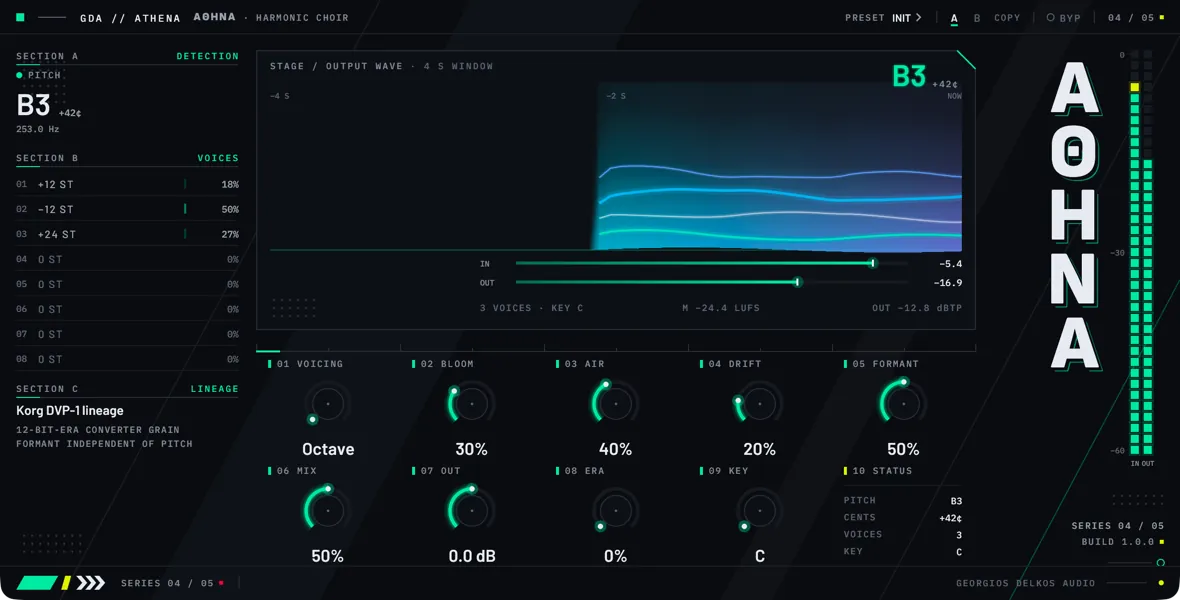
Overview
Athena is a vintage digital voice processor: a pitch-tracked harmonizer for a lead vocal or any other source that plays one note at a time. It follows the pitch of what comes in and builds up to five harmony voices from it, which you blend with the untouched signal. It is built for doubles, stacked harmonies, and choirs made from a single take.
Mode sets how the voices are made; on the faceplate it is the selector in the footer labeled MODE. Harmonize stacks the intervals of one of five voicings: Octave, Fifth, Third, Scale, and Cluster. Scale counts its intervals in the steps of a major key you choose with Key, so its harmonies stay in the song. Shift puts every voice at one interval that you set in cents. Vocoder replaces the shifted voice with an internal oscillator that follows the tracked pitch and takes on the vowels of the input.
The formants, the resonances that make a voice sound like a particular person, are handled separately from the pitch. A voice moved up an octave keeps the singer’s size and character instead of turning small and shrill, and Formant moves that character on its own. Era adds the grain and reduced bandwidth of a 12-bit converter to the voices, Bloom sets how many of them sound, Drift lets each one wander in pitch, and Air adds brightness and breath.
Three things are worth knowing before you start. The voices exist only while Athena can find a pitch: on silence, noise, consonants, or chords there is nothing to harmonize, and the voices stop. The voices are mono and sit in the center, while the dry signal keeps its stereo image. And eleven parameters, listed under Host-only parameters, have no control on the faceplate: you reach them through the host’s own parameter list or automation lanes, and they are saved with the session like the rest.
Quick start
- Insert Athena on a lead vocal track, or on another source that plays one note at a time. A chord or a full mix gives the pitch tracker nothing stable to follow.
- Play the track and watch the DETECTION section at the top left of the faceplate. It should name the note being sung and follow the melody; NO PITCH on a held note means the voices are silent too.
- Leave Mode at Harmonize. Mode is the selector at the right of the footer switches, labeled MODE on the faceplate, and it shows the current mode; a host lists it as Mode. Then choose a Voicing. Octave is the plainest place to start; Third and Fifth give fixed intervals; Scale gives harmonies that follow a key. With Octave you should hear one voice an octave above the lead and one an octave below.
- If you chose Scale, set Key to the key of the song. Key names a major scale, so for a song in a minor key choose its relative major, C for A minor. Listen for the harmony changing between major and minor thirds as the melody moves.
- Turn Bloom up to bring in more voices, and watch the VOICES section: each row shows a voice’s interval in semitones and the level Bloom gives it. The harmony should get fuller without getting louder.
- Turn Drift up until the voices sound like separate singers, or down to zero if octaves or tuned intervals start to waver against each other.
- Move Formant away from its center only if you want to change the character of the voices: lower for a larger, darker voice, higher for a smaller, brighter one.
- Set Air by ear: up for brighter, breathier voices, down if they are too bright against the lead.
- Turn Era up if you want the grainy, band-limited tone of an early digital unit on the voices. At zero it does nothing.
- Set Mix for the balance between the lead and the voices: low for a double tucked under the lead, high for a choir that stands on its own.
- Turn Output until the level is the same with Bypass in and out, so that you judge the harmony and not the loudness.
- Read the status line on the stage: it shows how many voices Bloom has brought in, the key, the momentary loudness, and the true peak of the output. The true-peak figure changes color above -1 dBTP.
Signal flow
- Input. The stereo input is kept as the dry signal for Mix and Bypass and delayed by Athena’s latency so that it lines up with the voices. Left and right are also summed to mono, and everything on the wet side is made from that sum.
- Pitch tracking. The tracker reads the mono input and reports a pitch, or none. Window sets how long it listens. Portamento and Porta Hold smooth the pitch the voices are built from.
- Formant analysis. The resonances of the input are measured and separated from its raw, buzzing source.
- Voices. Each voice shifts that source by its interval: the Voicing and Key in Harmonize, Pitch Shift in Shift. Drift, the pitch envelope, and MG Pitch are added to the interval. In Vocoder the shifted source is replaced by the Wave oscillator at the same pitch. The measured resonances are then put back on each voice, moved by Formant and Kbd Track.
- Voice sum. Bloom sets how many voices are heard. They are averaged. The result is turned down whenever its average level is above the input’s, and its peaks are kept within twice the input’s.
- Voice envelope and Breath. DCA EG Attack and DCA EG Release (DCA is the digitally controlled amplifier that sets the level of the voices, EG its envelope) fade the voices in and out as the pitch is found and lost. Breath lets the dry signal through in the gaps.
- Chorus. With Chorus on, the wet signal is blended with a delayed, modulated copy of itself.
- Tremolo. MG DCA modulates the level.
- Gate. Gate Threshold and Gate Decay turn the wet signal down when it falls below the threshold.
- Era. The converter color is applied.
- Air. The high shelf and the breath noise are added.
- Mix. The wet signal, the same in both channels, is crossfaded with the delayed dry signal from step 1.
- Output gain. Output is applied.
- Bypass. The Bypass crossfade is the last stage.
Latency
Athena delays the signal by about 10 ms and reports the figure to the host so that it can compensate. The figure depends only on the session sample rate: no control changes it, so nothing you adjust makes the host restart the plugin. The delay of the voices themselves follows the pitch being sung. They line up with the dry signal around 220 Hz, land behind it on lower notes (about 18 ms at 110 Hz, an octave down) and slightly ahead of it on higher ones (about 4.5 ms at 440 Hz).
Meters
- IN reads the peak level of the signal as it arrives.
- OUT reads the peak level of the output, after Output and Bypass.
- The DETECTION section and the large readout on the stage show the tracked note, how many cents sharp or flat of it the input is, and, in DETECTION, the frequency. They hold the last note for three quarters of a second through a gap, then show NO PITCH. They show the pitch as tracked, before Portamento.
- The VOICES rows show each voice’s interval, rounded to the nearest semitone, and its level as Bloom sets it. The levels follow Bloom and Chorus, not the audio, so they read the same when no pitch is found. A voice that Bloom has less than half faded in shows 0 ST and 0%, although it is already faintly audible.
- The wave on the stage shows the output level over the last four seconds.
- The loudness figure is momentary loudness (a 400 ms window, in LUFS) and the true-peak figure is in dBTP. Both are measured on the output, after Output and Bypass.
Controls
Top strip
- Choices
- Off, On
- Default
- Off
Takes the processing out and passes the input through, with a 10 ms crossfade so it can be automated without clicks. The bypassed signal is still delayed by Athena's latency, so switching Bypass does not shift the audio against the rest of the session. Output is not applied to the bypassed signal.
When processing comes back in, the pitch tracker starts again from nothing, so the voices return a moment later, once it has found the pitch. On the faceplate this is the BYP button in the top strip.
Chorus
- Range
- 0.1 to 5 Hz
- Default
- 0.6 Hz
How fast the chorus delay sweeps back and forth. It is heard only while Chorus is on, and only as far as Chorus Intensity is turned up: with Chorus Intensity at zero the delay does not move and this control does nothing. It is also unheard with Chorus Effect at zero, where the delayed copy is left out. Slow rates give a gentle shimmer, fast ones a wobble. The faceplate labels it SPEED.
- Range
- 0 to 100%
- Default
- 50%
The balance, while Chorus is on, between the wet signal and its delayed copy. At 50 the two are equal, which is the usual chorus sound. Toward 100 only the delayed copy is left, so the doubling goes and a pitch wobble remains. At zero no delayed copy is heard at all, although Chorus still holds the choir to four voices.
The faceplate labels it FX.
Process
- Range
- -1200 to 1299 ct
- Default
- 0 ct
The interval of the voices in Shift mode: 100 cents is a semitone and 1200 an octave. It does nothing in Harmonize or Vocoder.
In Shift every voice plays this one interval, so Bloom adds copies at the same pitch and Drift spreads them. At zero the voices sit at the sung pitch, which makes a doubler. The formants do not move with the shift unless Kbd Track is turned up. The faceplate labels it PITCH.
- Range
- 0 to 100%
- Default
- 0%
How far each voice's formants follow its pitch interval. At zero they stay where the singer's are, so a voice an octave up keeps its natural size. At 100 they move by the whole interval, as on a plain pitch shifter: voices above the lead turn smaller and brighter, voices below it larger and darker.
The shift is added to the one Formant sets, and the two together are limited to two octaves either way. The faceplate labels it KBD.
- Range
- 0 to 100%
- Default
- 100%
How long the pitch tracker listens before it names a pitch. A long window reaches low notes; a short one answers sooner. At 100 the tracker follows notes down to 60 Hz. At zero the window is about a third as long and the lowest note it follows is 200 Hz; at 50 the floor is about 92 Hz and at 25 about 126 Hz.
A note below the floor is not tracked, and the voices fall silent on it. Leave this at 100 for low voices. Turn it down for a high voice when the harmonies arrive late on fast lines. The faceplate labels it WIN.
- Range
- 0 to 100%
- Default
- 0%
What the wet side does when no pitch is found, as on consonants, breaths, and noise. At zero it is silent there, so at a high Mix the words lose their consonants. Turned up, that share of the dry signal, summed to mono, is let through in the gaps. It fades in as the voices fade out and is timed to line up with the dry signal.
The signal let through passes Chorus, the gate, Era, and Air like the voices do.
- Choices
- Saw, Square, Triangle, Pulse
- Default
- Saw
The waveform of the oscillator that replaces the shifted voice in Vocoder mode. It does nothing in Harmonize or Shift. The oscillators are not band-limited, so high notes pick up some aliasing.
Saw has every harmonic. It is the brightest of the four and the closest to the buzz of a voice.
Square is a pulse of equal halves, with odd harmonics only, which gives a hollow tone.
Triangle has weak upper harmonics and is the darkest.
Pulse is a narrow pulse, a quarter of the cycle wide, with a thinner, more nasal tone than Square.
Mod
- Range
- 0.1 to 20 Hz
- Default
- 5 Hz
The rate of the modulation generator, a slow oscillator that adds vibrato and tremolo to the voices. On its own it does nothing: MG Pitch sets the vibrato depth, MG DCA the tremolo depth and MG Delay how long after the start of a note they begin. Those three are listed under Host-only parameters. The faceplate labels this control MG.
- Range
- 0 to 1000 ms
- Default
- 0 ms
Glide time. At zero the voices jump to each new note as soon as it is tracked. Above zero, the pitch the voices are built from slides from the previous note to the new one, quickly at first and then more slowly. The setting is the time the slide takes to cover about two thirds of the distance; it settles in three to four times that. The dry signal is not changed.
A slide starts from the previous note only while the pitch is tracked without a break. After a gap the first note is taken at once, unless Porta Hold is on. The faceplate labels it PORTA.
- Range
- 0 to 1200 ct
- Default
- 0 ct
The depth of the pitch envelope, a bend applied to every voice at the start of a note. Each time a pitch is found after a gap, the bend grows from nothing to this amount over Pitch EG Attack and then falls back to nothing over Pitch EG Decay. Pitch EG Polarity sets its direction. At zero there is no bend.
The envelope starts only after a gap in the tracked pitch, not on every note of a line sung without a break. The faceplate labels it EG INT; the attack, decay and polarity are listed under Host-only parameters.
Main controls
- Choices
- Octave, Fifth, Third, Scale, Cluster
- Default
- Octave
Chooses the intervals of the voices in Harmonize and Vocoder. Shift ignores it. The voices come in as Bloom rises, in the order given below. Where a voicing has fewer than five different intervals, the remaining voices repeat the first ones, and Drift turns the repeats into a thicker unison.
Octave is an octave above, then an octave below.
Fifth is a fifth above, then an octave above, then a fourth below.
Third is a major third above, then a fifth above, then an octave above: a major chord on the sung note, whatever the key.
Scale is a third, a fourth, a fifth and an octave above, then a fourth below, each counted in steps of the major scale that Key sets, so the third is major or minor as the scale needs. The intervals are measured from the scale note nearest to the sung pitch, so a note sung a little flat or sharp still gets harmonies that are in tune. In Vocoder mode Scale does not follow Key: it plays a fixed minor third, fourth, fifth, and octave above and a fourth below.
Cluster is 25 cents above, then 25 cents below, then one, two, and three semitones above. With Bloom low it is a detuned double; with Bloom high it is a dissonant cluster.
- Range
- 0 to 100%
- Default
- 30%
How many voices sound. At zero there is one voice, the first of the Voicing. At 100 there are five, or four with Chorus on. In between, each further voice fades in gradually, over a quarter of the range with Chorus off and a third of it with Chorus on.
The voices are averaged and not added up, so more voices make the harmony fuller and not louder.
- Range
- 0 to 100%
- Default
- 40%
Brightness and breath for the voices. It raises a high shelf from about 5 kHz, by up to about 12 dB at 100, and adds a low level of noise that follows the level of the wet signal, so there is none when the voices are silent. At zero it does nothing.
It works on the wet side only, and after Era, so it can put back some of the top end that Era takes away.
- Range
- 0 to 100%
- Default
- 20%
Slow, random detuning. Each voice wanders on its own, gliding to a new offset about every two seconds, by up to 30 cents either way at 100. It makes copies at the same interval sound like separate singers.
Drift works only while Unison is on. For octaves and other intervals that should stay exactly in tune, turn it down or switch Unison off.
- Range
- 0 to 100%
- Default
- 50%
Moves the vocal character of every voice without changing its pitch. At the center, 50, nothing is moved: the voices keep the singer's formants even when they are shifted in pitch, which is why they do not sound sped up or slowed down. Above the center the formants go up, for a smaller, brighter voice; below it they go down, for a larger, darker one. The full travel is one octave either way.
It works in all three modes. Kbd Track adds a further shift that depends on each voice's interval.
- Range
- 0 to 100%
- Default
- 50%
An equal-power blend between the dry signal and the voices: at 50 each is about 3 dB down, so the loudness stays roughly even as you turn it. The dry side is delayed by Athena's latency so that it lines up with the voices.
The dry signal keeps its stereo image. The voices are mono and go equally to both channels, so at 100 the output is mono.
- Range
- -24 to 24 dB
- Default
- 0 dB
Gain after Mix, on the dry signal and the voices together; only Bypass follows it. Use it to match the level with Bypass in and out. It is not applied to the bypassed signal. The faceplate labels it OUT.
- Range
- 0 to 100%
- Default
- 0%
The color of an early digital converter, on the voices only. At zero the stage is out of the path. As it rises, the signal is quantized more and more coarsely, down to 12 bits at 100, in steps that are finer for quiet signal than for loud, and a low-pass filter comes down to 6.5 kHz at 100. The result is grainier and darker.
The dry signal is not touched. Air comes after this stage, so it can brighten what Era has dulled.
- Choices
- C, C#, D, D#, E, F, F#, G, G#, A, A#, B
- Default
- C
The root of the major scale that the Scale voicing counts its intervals in. It has an effect only with Mode at Harmonize and Voicing at Scale; every other voicing and both other modes ignore it.
For a song in a minor key, choose the relative major: C for A minor, G for E minor. The stage and the status readout on the faceplate show the key whatever the voicing.
Footer
- Choices
- Off, On
- Default
- Off
Blends the wet signal with a copy of itself delayed by about 12 ms, with the delay swept by Chorus Speed and Chorus Intensity and the balance set by Chorus Effect. It thickens the voices. The dry signal is not affected.
While Chorus is on, the choir is held to four voices instead of five. Switching it fades over 10 ms, so it can be automated without clicks.
- Choices
- Off, On
- Default
- On
Switches Drift in and out. On, each voice is detuned by as much as Drift sets. Off, Drift is ignored and every voice sits exactly on its interval. It does nothing else: the number of voices and their intervals stay the same.
- Choices
- Off, On
- Default
- Off
Decides what Portamento does across a gap in which no pitch is tracked, such as a rest or a consonant. Off, the first note after the gap is taken at once and the glide starts afresh. On, the last tracked pitch is kept through the gap, so the next note glides in from it.
It is meant to be used with Portamento above zero. The faceplate labels it HOLD.
- Choices
- Harmonize, Shift, Vocoder
- Default
- Harmonize
Chooses how the voices are made. Switching into or out of Vocoder crossfades over 10 ms. On the faceplate this is the selector at the right of the footer switches, which carries the label MODE; click it to step to the next mode.
Harmonize makes the voices from the input itself, shifted to the intervals of the Voicing.
Shift makes them the same way but puts every voice at the single interval set by Pitch Shift. Voicing and Key are ignored.
Vocoder replaces the shifted input with an internal oscillator, chosen by Wave, at the tracked pitch and the intervals of the Voicing, and shapes it with the formants of the input. The result follows the words and the melody of the input in a synthetic tone. The pitch still comes from the input: there is no keyboard or sidechain input for the notes.
Host-only parameters
- Range
- 0 to 100%
- Default
- 35%
How far the chorus delay is swept. At zero the delay stays fixed at 12 ms, so Chorus gives a static doubling and Chorus Speed does nothing. At 100 it sweeps between 12 and 20 ms. It is heard only while Chorus is on.
Like every parameter in this group, it has no control on the faceplate: you reach it through the host's parameter list or automation.
- Range
- -80 to 0 dB
- Default
- -80 dB
The level below which the gate turns the wet signal down. The gate listens to the wet signal after Chorus and closes steeply once it falls below this level, which removes quiet tails and noise from the voices between phrases. The dry signal is not gated. At the bottom of its range the gate is in effect off.
- Range
- 10 to 2000 ms
- Default
- 100 ms
How slowly the gate's level reading falls once the wet signal drops, and so how long the gate takes to close. Short times cut the voices off tightly; long times let their tails through. The gate opens within a few milliseconds whatever this is set to. It makes no audible difference while Gate Threshold is at the bottom of its range.
- Range
- 0 to 2000 ms
- Default
- 0 ms
How long after the start of a note the vibrato and tremolo of the modulation generator begin. The start of a note here means a pitch being found after a gap. Once the time has passed they come in at their full depth. At zero they are there from the start. Use it to keep the beginning of each note steady and let the movement in on held notes.
- Range
- 0 to 100%
- Default
- 0%
Vibrato depth: how far the modulation generator moves the pitch of every voice. At 100 the pitch swings a semitone either way; at zero there is no vibrato. MG Freq sets the rate and MG Delay the onset. The dry signal is not changed.
- Range
- 0 to 100%
- Default
- 0%
Tremolo depth: how far the modulation generator moves the level of the wet signal. DCA stands for digitally controlled amplifier, the stage that sets that level. At 100 the level swings between half and one and a half times; at zero there is no tremolo. MG Freq sets the rate and MG Delay the onset.
- Range
- 1 to 5000 ms
- Default
- 10 ms
The time the pitch envelope takes to grow from nothing to the full Pitch EG Intensity after a note starts. With a short time the voices are bent almost at once and then settle onto their intervals over Pitch EG Decay; with a long one they slide away from their intervals first. It is not heard while Pitch EG Intensity is at zero.
- Range
- 1 to 5000 ms
- Default
- 200 ms
The time the pitch envelope takes to fall back to nothing once it has reached its full depth, that is, how long the voices take to settle onto their intervals. It is not heard while Pitch EG Intensity is at zero.
- Choices
- Up, Down
- Default
- Up
The direction of the pitch envelope. It is not heard while Pitch EG Intensity is at zero.
Up bends the voices above their intervals, so with a short Pitch EG Attack each note starts sharp and falls into place.
Down bends them below, so each note starts flat and rises into place.
- Range
- 0 to 2000 ms
- Default
- 0 ms
How quickly the voices fade in when a pitch is found. DCA EG is the level envelope of the voices. At zero they come in at once. Above zero the fade is quick at first and then slower: the voices reach about two thirds of their level in the set time and settle in three to four times that. Longer times soften the entry of each phrase.
- Range
- 0 to 2000 ms
- Default
- 0 ms
How quickly the voices fade out when the pitch is lost. At zero they are cut at once. Above zero they fall about two thirds of the way in the set time and are gone in three to four times that. As they fade, Breath takes over the wet side, and the vibrato and tremolo of the modulation generator fade with them.
The voices are made from the input and follow its level, so a release is heard only while the input carries on, over a consonant or a breath at the end of a note. When the input stops into silence the voices stop with it, within about a tenth of a second at any setting.