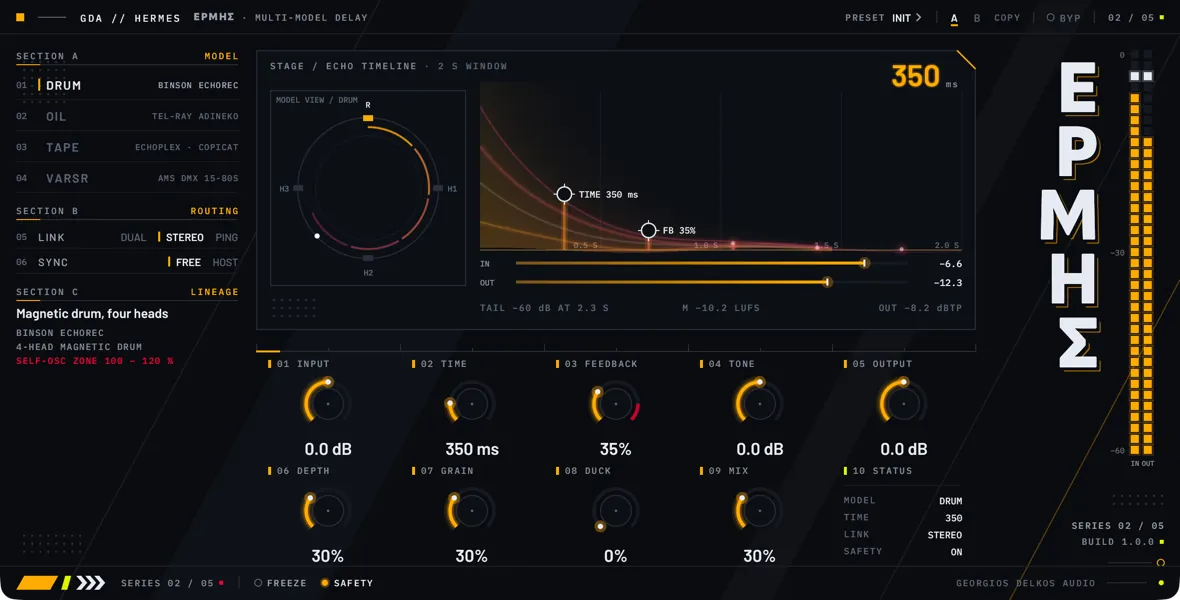
Hermes is a stereo delay with four models: magnetic drum, oil-can, tube tape, and early digital. All four share the same controls for time, feedback, tone, ducking, and mix, and each adds its own way of coloring the repeats and wearing them down as they recirculate. Time can be set in milliseconds or locked to the host tempo, the repeats can stay on their side, spread, or bounce between left and right, and Freeze holds a loop of them for as long as you like.
Choosing a model is the first decision. Drum is a magnetic drum with four playback heads spaced evenly along the delay time; it is the cleanest of the three mechanical models, with a pitch that is steady apart from the slight wobble WOBBLE adds, and its heads can be combined into multi-tap patterns. Oil is an oil-can: dark and narrow, with an irregular pitch warble, and each repeat is darker than the one before. Tape is a tape loop that saturates, loses highs on every pass and carries wow and flutter. VarSR is an early 12-bit digital delay: steady, wide-band, with the grain of a coarse converter.
Each model has two character controls of its own, on the first two knobs of the lower row of cells, which carry the numbers 06 and 07. The faceplate renames them when you change Model: WOBBLE and HEADS for Drum, VISCOUS and DRIFT for Oil, BIAS and WOW for Tape, and TREBLE and GRIT for VarSR. A host’s parameter list always calls them Char A and Char B. They keep their positions when you switch model, and the same position then does something different.
Three things are worth knowing before you start. Tone works on the delayed signal after the feedback loop, so it colors every repeat equally; the way repeats darken one after another comes from the model and its character controls. Feedback goes above 100 percent, where the delay feeds itself and keeps sounding without input, and Safety decides how loud that gets. And switching Model, or leaving Bypass on, empties the delay: a tail in progress does not carry over.
Hermes delays the signal by 54 samples, about 1.1 ms in a 48 kHz session, and reports the figure to the host so that it can compensate. The delay comes from running the delay models at twice the session sample rate. No control changes it, so nothing you adjust makes the host restart the plugin. The dry signal and the bypassed signal are delayed by the same amount.
Routing
- Choices
- Dual, Stereo, PingPong
- Default
- Stereo
Sets how the left and right delays feed back into each other. Both sides always run the same model at the same Time. On the faceplate this is the LINK row, with the choices DUAL, STEREO, and PING.
Dual keeps left and right as two separate delays. Each feeds back only into itself, so repeats stay on the side they came from. The pitch movement of the models is the same on both sides, so a mono source stays mono.
Stereo sends 30 percent of each side's feedback to the other side. The first repeat stays where the source is, and the later repeats of a source panned to one side spread across to the other. A mono or centered source sounds the same as in Dual.
PingPong sums the input to mono, feeds it to the left delay only and crosses the feedback over, so the repeats alternate left, right, left, right, starting on the left. A stereo source loses its width in the repeats, and with Feedback at zero there is only the one repeat, on the left. On a mono track there is no right channel to bounce to, and this choice behaves as Dual.
- Choices
- Off, On
- Default
- Off
Locks the delay time to the host tempo. Off, Time is in milliseconds. On, Time selects one of nine note values and the delay is the length of that note at the host tempo; the Time entry lists them. On the faceplate this is the SYNC row, with the positions FREE and HOST.
Hermes uses the tempo the host reports, whether the transport is running or stopped, and follows it when it changes. If the host reports no tempo, the Time setting applies in milliseconds as if Sync were off, although the faceplate still shows the note value.
Sync sets the length of the delay only. The repeats are not lined up with the bar or the beat position of the song. The delay cannot be longer than 4.5 seconds, which only limits the longest note values below 20 BPM.
Main controls
- Range
- -24 to 24 dB
- Default
- 0 dB
Gain on the signal as it enters Hermes, ahead of the delay and ahead of the dry side of Mix, so it changes the level of both. Raising it pushes the Tape model further into saturation and raises the level that Duck responds to. The IN meter reads before it, and the bypassed signal does not pass through it.
- Range
- 1 to 2000 ms
- Default
- 350 ms
The delay time. In the Drum model it is the time of one turn of the drum, which is the delay of the longest head. The other heads sit at a quarter, a half, and three quarters of it, so with a shorter head chosen by HEADS the repeat arrives sooner than Time reads.
Moving Time while audio plays is heard differently in each model. In Drum, Oil, and Tape a small move slides the delay, which bends the pitch of the repeats by up to an octave, as a machine changing speed does. A jump of more than 15 ms longer or 30 ms shorter crossfades to the new time over 30 ms instead. VarSR always crossfades, so its repeats keep their pitch.
With Sync on, Time selects a note value, and turning it up still lengthens the delay. The faceplate then shows the note value, while a host's parameter list and automation lanes keep showing milliseconds. The nine values sit 250 ms apart on that scale: a value near 250 ms selects 1/16, near 500 ms 1/8T, and so on up to 1/4D at the top. Switching Sync on therefore does not keep the time you had; it takes the note value nearest to where the control stands. The lengths below are at the host tempo.
1/16T is a sixteenth-note triplet, a sixth of a quarter note.
1/16 is a sixteenth note, a quarter of a quarter note.
1/8T is an eighth-note triplet, a third of a quarter note.
1/16D is a dotted sixteenth, three eighths of a quarter note.
1/8 is an eighth note, half a quarter note.
1/4T is a quarter-note triplet, two thirds of a quarter note.
1/8D is a dotted eighth, three quarters of a quarter note.
1/4 is a quarter note.
1/4D is a dotted quarter, one and a half quarter notes.
- Range
- 0 to 120%
- Default
- 35%
How much of the delay's output is fed back into it, and so how many repeats you hear. At zero the delay plays its input once. Each repeat comes back at this share of the one before, less whatever the model takes away. The feedback is taken before Tone, and a 20 Hz high-pass in the loop keeps DC and subsonic rumble from building up.
Above 100 the loop returns more than it receives. The repeats grow instead of dying away until a soft ceiling in the loop holds them, and the delay keeps sounding with no input: self-oscillation. The faceplate marks this zone in red, and from 100 up the status line reads SELF-OSC in place of a tail time.
How loud the loop gets depends on the model and on Safety. In the Drum, Oil, and VarSR models with Feedback at its highest, the delayed signal settles at about -1 dBFS with Safety on and up to about 12 dB above full scale with Safety off. In the Tape model the tape's own saturation keeps it under full scale in both positions. To stop a loop that is feeding itself, bring Feedback back below 100 and let it decay, or switch Bypass on, which empties the delay.
In the Tape model with BIAS near the top of its range, the tape itself adds a little level around 2 kHz, and the loop can stop dying away slightly below 100. It stays quiet there, around -26 dBFS or lower, and the status line shows SELF-OSC when it applies.
- Range
- -12 to 12 dB
- Default
- 0 dB
Changes the balance between the lows and the highs of the delayed signal, and its level with it. Turning it up raises the highs by up to the amount shown and lowers the deep lows. Turning it down raises the lows by up to the amount shown and lowers the top. At zero it is flat. It is not an even tilt: the two halves are split at 700 Hz and overlap widely, so the middle rises in both directions, by about 9 dB at 700 Hz at either end of the range, and more is raised than is lowered. Expect the repeats to get louder in either direction as well as change color.
Tone sits after the feedback loop, so every repeat, the first included, gets the same tilt, and it does not build up from one repeat to the next. The progressive darkening of the repeats comes from the model and its character controls. Turning Tone either way raises the level of the delayed signal and its peaks, by up to the amount shown: in the highs when turned up, in the lows when turned down. Tone does not change a loop that Freeze is holding: the loop keeps the tone it was captured with.
- Range
- -24 to 24 dB
- Default
- 0 dB
Gain after Mix, on the dry and the delayed signal together; only Bypass follows it. Use it to match the level with Bypass in and out. It is not applied to the bypassed signal.
- Range
- 0 to 100%
- Default
- 30%
The first of the two character controls: the first knob of the lower row of cells on the faceplate, below Input and to the left of the second character control. Its cell carries the number 06. A host's parameter list calls it Char A; the faceplate names it for the selected model, and what it does depends on the model.
WOBBLE, in the Drum model, is the speed instability of the drum. At the bottom the drum is steady. Raising it adds a pitch wobble that cycles once per turn of the drum, that is, once per Time, together with a slower random drift. It is subtle by design: at the top the pitch moves by about 1 percent, some 17 cents.
VISCOUS, in the Oil model, sets the low-pass on the oil-can's output: about 3 kHz at the bottom, its brightest, down to about 700 Hz at the top. Every repeat passes through it again, so higher settings make the tail darken faster.
BIAS, in the Tape model, is the record bias. At the bottom the repeats are dark, 3 dB down at about 1.5 kHz after one pass; at the top they are open to about 8 kHz. Raising it also drives the tape harder, so it saturates at a lower level: the most a repeat can reach falls from about full scale at the bottom to about -14 dBFS at the top, and loud signals come back compressed.
TREBLE, in the VarSR model, is the bandwidth of the converter: a low-pass ahead of the recording, at about 4 kHz at the bottom and about 18 kHz, the full bandwidth, at the top. Every repeat is recorded through it again, so lower settings darken the tail.
- Range
- 0 to 100%
- Default
- 30%
The second of the two character controls: the second knob of the lower row of cells on the faceplate, between the first character control and Duck. Its cell carries the number 07. A host's parameter list calls it Char B; the faceplate names it for the selected model, and what it does depends on the model.
HEADS, in the Drum model, is a twelve-position selector for which of the four heads are heard. From the bottom up: each head alone, from the shortest to the longest; the pairs 1+2, 2+3 and 3+4; the pairs 1+3 and 2+4; the triples 1+2+3 and 2+3+4; and all four. As Hermes opens it selects the longest head alone, so the delay equals Time. The selected heads are averaged, so more heads give more and quieter taps, not a louder signal. The feedback is taken from all the selected heads, so with several of them and Feedback turned up the taps multiply into a dense wash. A change of position crossfades over 5 ms.
DRIFT, in the Oil model, is the depth of the pitch warble, made of two slow wobbles at unrelated rates so that it never settles into a pattern. At the bottom the pitch is steady. Raising it deepens the warble and speeds it up, from 0.3 Hz to 1.5 Hz for the faster of the two; at the top the pitch of a repeat moves by up to about a semitone.
WOW, in the Tape model, is the depth of wow and flutter together: a slow pitch movement at 1.7 Hz and a fast one at 35 Hz. At the bottom the transport is stable. The top is a worn machine, with the tape speed off by up to 1 percent from wow and 0.3 percent from flutter.
GRIT, in the VarSR model, is the resolution of the converter. At the bottom it is 12 bits with companding, which gives quiet signals finer steps than loud ones. Raising it coarsens the steps, down to 8 bits at the top, for a rougher grain. The feedback is converted again on every pass.
- Range
- 0 to 100%
- Default
- 0%
Turns the delayed signal down while the input is playing and lets it back up when the input stops, so the repeats stay out of the way of the source and fill the gaps. There is no external sidechain: it follows Hermes's own input, after Input, taking the louder of the two channels and turning both sides down equally. It turns down within a few hundredths of a second and comes back over roughly a fifth of a second.
The reduction is the setting multiplied by the input level. At 100 a full-scale input turns the delayed signal far down, by about 20 dB for a steady tone, and an input at about -6 dBFS roughly halves it, so a quiet source ducks little at any setting.
Duck acts on the output of the delay, not inside the loop. The repeats keep recirculating underneath and are there when the input stops. It also works on a loop held by Freeze.
- Range
- 0 to 100%
- Default
- 30%
An equal-power blend between the dry signal and the delayed signal: at 50 each is about 3 dB down, so the loudness stays roughly even as you turn it. The dry side is the input after Input, delayed by Hermes's latency so that it lines up with the delayed signal. On a send, set it to 100 so that the return carries only the repeats. Duck and Freeze act on the delayed side only.
Footer
- Choices
- Off, On
- Default
- Off
Holds the repeats. When you switch it on, Hermes locks the last stretch of the delayed signal, one delay time long (the Time setting, or the note value with Sync on), and replays it as a loop for as long as Freeze stays on. The loop is replayed as it was captured and does not pass through the model again, so it does not get darker, quieter, or more distorted however long you hold it. The status line reads FROZEN.
Freeze captures what the delay was playing, not what is coming in, so switch it on while repeats are sounding; if the delay was silent over the last delay time, so is the loop. With a very short Time the loop repeats fast enough to be heard as a pitch.
While it is on, the input no longer reaches the delay, although the dry signal still passes through Mix. Time, Feedback, Tone, Model, Link, and the character controls do not change the held loop. Duck, Mix, and Output still act on it.
Switching it on or off crossfades over 20 ms, and the join of the loop is crossfaded over up to 10 ms, so neither clicks. On release the loop fades out and the live delay returns. That delay has been running without input in the meantime, and its repeats have been dying away at the Feedback setting, so after a long hold the loop simply ends instead of decaying as repeats. With Feedback above 100 the delay has kept feeding itself underneath and comes back.
- Choices
- Off, On
- Default
- On
Sets how loud a loop that feeds itself may get. A soft ceiling in the feedback loop is always there, so the loop cannot grow without limit in either position. The status cell on the faceplate shows the state of the switch.
On, what is fed back is also held about 1 dB under full scale. With Feedback at its highest the delayed signal then settles at about -1 dBFS in the Drum, Oil, and VarSR models. It works on the feedback only, never on the first repeat, and progressively: feedback below about -4 dBFS changes by a fraction of a decibel at most.
Off, only the loop's own ceiling acts. With Feedback at its highest the Drum, Oil, and VarSR models settle up to about 12 dB above full scale. Turn your monitors down before you try it.
The Tape model is different: its own saturation, not Safety, sets the level a runaway loop settles at. That level depends on BIAS, falling as BIAS rises, and it stays under full scale at any BIAS setting with Safety on or off. Safety changes it by about a decibel at most, and only with BIAS near the bottom.
These levels are for the delayed signal alone, with Tone at zero and no input playing. Safety limits what the loop adds, not what you put in: input that is still playing is recorded on top of the feedback, and a Tone boost, Mix, and Output come after it. The output can therefore still go over full scale with Safety on.