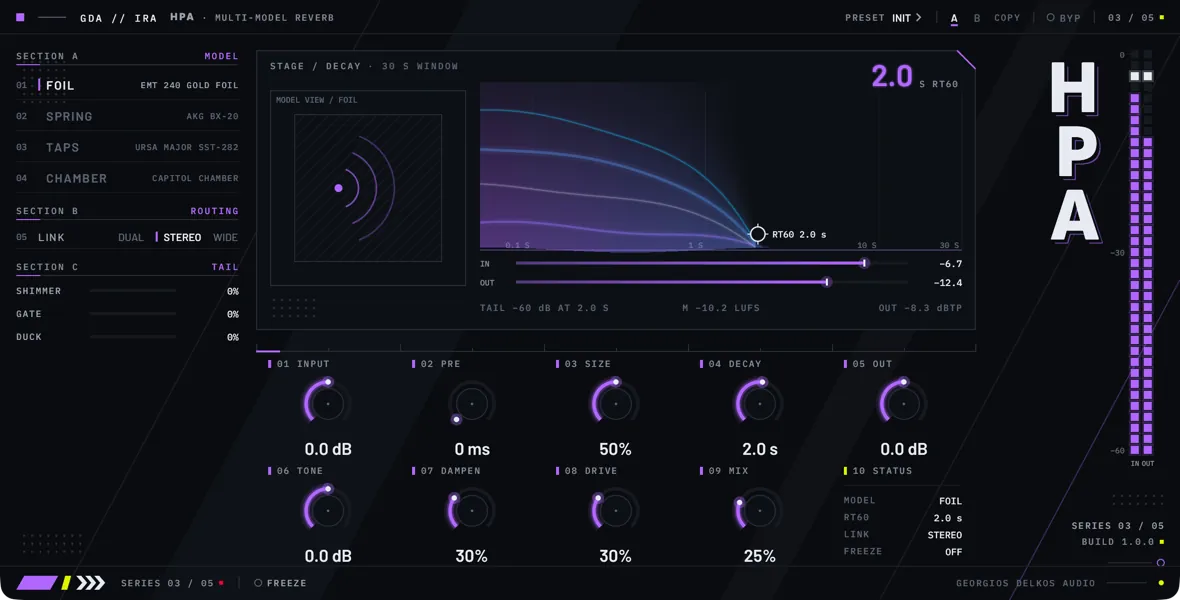
Ira is a stereo reverb with four models: gold-foil plate, torsion spring, multi-tap network, and live chamber. All four share the same controls for pre-delay, size, decay, tone, and mix. After the model, the reverb can be made to follow the level of the input, given an octave-up layer, or ducked under the input, and Freeze holds the tail for minutes.
Choosing a model is the first decision. Foil is a gold-foil plate: the darkest of the four, a bank of plate resonances with a diffuse tail behind it. Spring is a set of torsion springs: it answers a moment late, chirps on transients, and can run one, two, or three springs. Taps is a network of sixteen taps on one short delay: a cluster of reflections with a short tail that keeps moving. Chamber is a live chamber: a room with early reflections and a microphone that feeds its sound back to the loudspeaker.
Each model has two character controls of its own, in the same two positions on the faceplate. The faceplate renames them when you change Model: TENSION and DAMPING for Foil, TWANG and DENSITY for Spring, SPREAD and TILT for Taps, and AIR and DAMPING for Chamber. A host’s parameter list always calls them Char A and Char B. They keep their positions when you switch model, and the same position then does something different.
Three things are worth knowing before you start. Decay is the decay time the model is set to, not a measurement: the damping inside the model shortens the real tail, and the Taps model cannot follow Decay beyond a limit that the faceplate shows. Tone works on the reverb after the model, so it colors the whole tail equally; making the highs die away sooner than the lows is the job of the model’s DAMPING or TILT control. And switching Model, or leaving Bypass on, empties the reverb: a tail in progress does not carry over.
Ira adds no latency and reports none to the host. No control changes that, so nothing you adjust makes the host restart the plugin. The dry signal and the bypassed signal are not delayed. Ira also reports the length of its tail to the host, as an upper estimate worked out from the settings, so that a bounce or a host that suspends silent plugins does not cut the reverb off. While Freeze is on it reports a tail that does not end.
Model
- Choices
- Foil, Spring, Taps, Chamber
- Default
- Foil
Chooses the reverb. Each model has its own tone, its own way of building and losing its tail, and its own meaning for Size and for the two character controls, which the faceplate renames when you switch. The character controls keep their positions, so check them after changing model.
Switching fades the reverb out over 10 ms, changes model, and fades it back in over 10 ms. The new model starts empty, so a tail in progress does not carry over, and neither does a tail held by Freeze. The four models are trimmed to return about the same level at the settings Ira opens with, measured on full-range material. They do not share a frequency response, so on other material the level differs: bright material comes back lower in Foil than in the other three.
Foil is a gold-foil plate. The input drives a bank of plate resonances through a band from about 90 Hz to 5.5 kHz, and a diffuse late stage behind them carries the decay. It is the darkest of the four. Its character controls are TENSION and DAMPING. The faceplate caption is GOLD FOIL PLATE.
Spring is a set of one to three torsion springs. Nothing is heard until the first wave has crossed the spring, a little over 30 ms at the Size Ira opens with. Every pass along the spring smears transients further into a chirp, and the echoes lose treble above about 5 kHz as they recirculate. Its character controls are TWANG and DENSITY. The faceplate caption is TORSION SPRING.
Taps is a multi-tap network: sixteen unevenly spaced taps on one short delay, summed and fed back. The taps move slowly in pairs, in opposite directions, so the tail keeps changing without drifting in pitch. What recirculates is limited to about 7 kHz and loses its lows below about 80 Hz. Its tail is short by nature and stops following Decay at a limit described under Decay. Its character controls are SPREAD and TILT. The faceplate caption is 16-TAP NETWORK.
Chamber is a live chamber: a room with a fixed pattern of early reflections in about the first 17 ms, a diffuse tail, and a microphone that feeds the room's sound back to its loudspeaker. Its character controls are AIR and DAMPING. The faceplate caption is LIVE CHAMBER.
Tail
- Range
- 0 to 100%
- Default
- 0%
Adds an octave-up layer to the reverb. The output of the model, after Gate, is shifted up one octave and added to the reverb at the level set here; the reverb itself is not turned down. The shifter also feeds on its own output at a fixed 55 percent, so each pass adds another, quieter octave on top of the last. A low-pass at about 10 kHz sits ahead of the shifter. The shifter works in short grains, so on steady, pitched material the octave carries a fast flutter, and the layer starts a few milliseconds behind the reverb.
The layer is added after the model and is not fed back into it, so it does not change the decay; it rings on briefly after the tail has gone. It works the same way in all four models and on a tail held by Freeze. Tone, Link, and Duck act on it together with the rest of the reverb. At zero the shifter is switched off.
- Range
- 0 to 100%
- Default
- 0%
Makes the level of the reverb follow the level of the input. It is not a gate with a threshold: at the top of its range the gain of the reverb is roughly the peak level of the input, so a full-scale input passes the reverb at full level, a quieter input turns it down by as much as it is below full scale, and silence closes it. Lower settings blend that behavior with the untouched reverb, so the reverb no longer closes completely: halfway, it is 6 dB down in silence and comes up toward full level as the input approaches full scale. At zero it does nothing.
It follows the louder of the two input channels, after Input, with time constants of about 3 ms rising and about 80 ms falling. Raising Input therefore opens it further. Use it with a long Decay for a reverb that is heard only while the source plays and fades out within a few tenths of a second after it stops.
Gate acts on the output of the model, before Shimmer. The model keeps decaying underneath, so if the input returns before the tail has gone, the rest of the tail is heard again. The octave-up layer of Shimmer rings on briefly after the gate has closed. Gate also turns down a tail held by Freeze when the input stops.
- Range
- 0 to 100%
- Default
- 0%
Turns the reverb down while the input is playing and lets it back up when the input stops, so the tail stays out of the way of the source and fills the gaps. There is no external sidechain: it follows Ira's own input, after Input. Each side is ducked by its own input channel, so a source on the left ducks the left side of the reverb. It turns down within a few hundredths of a second and comes back over roughly a fifth of a second.
The reduction is the setting multiplied by the input level. At 100 a full-scale input turns the reverb far down, by about 20 dB for a steady tone, and an input around -6 dBFS roughly halves it, so a quiet source ducks little at any setting.
Duck acts on the output of the reverb, after Tone, not inside the model. The tail keeps decaying underneath and is there when the input stops. It also works on a tail held by Freeze.
Main controls
- Range
- -24 to 24 dB
- Default
- 0 dB
Gain on the signal as it enters Ira, ahead of the reverb and ahead of the dry side of Mix, so it changes the level of both. It also raises the level that Gate and Duck respond to. The IN meter reads before it, and the bypassed signal does not pass through it. The faceplate labels it INPUT.
- Range
- 0 to 200 ms
- Default
- 0 ms
A delay ahead of the reverb, on the wet side only; the dry signal is not delayed. It separates the reverb from the source, so the source stays clear in front of a long tail. It works the same way in all four models, and what the model does in its first milliseconds comes on top of it: the Spring model's own onset delay, or the Chamber model's early reflections.
Moving it while audio plays slides the delay, which briefly bends the pitch of what is entering the reverb. The faceplate labels it PRE and shows whole milliseconds.
- Range
- 0 to 100%
- Default
- 50%
How long the delays inside the model are: the size of the plate, the spring, the tap pattern, or the room. In Foil, Spring, and Chamber, Decay keeps its meaning at every Size, because the model works out its loop gains from the lengths in use. Smaller settings build a denser reverb sooner; larger ones space the reflections out.
In Foil it scales the delays of the late stage from 0.6 to 1.4 times their nominal length. In Spring it scales the length of the springs over the same range, and with it the onset delay and the spacing of the echoes. In Chamber it scales the room from 0.4 to 2 times; the early reflections do not move.
In Taps it sets the delay of the longest tap, from 20 ms to 220 ms, before SPREAD shortens it, and the other fifteen taps keep their proportions. A longer pattern also raises the longest tail the Taps model can produce; see Decay.
Moving Size while the reverb is sounding briefly bends the pitch of the tail, in every model.
- Range
- 0.1 to 30 s
- Default
- 2 s
The decay time the model is set to: in Foil, Spring, and Chamber, the time the tail takes to fall by 60 dB in the mid band. It sets the gains of the model's loops and is not a measurement of the result. The damping inside the loop, DAMPING in Foil and Chamber and a fixed loss above 5 kHz in Spring, takes its share on every pass, so the tail you measure is shorter than the setting, more so at long settings. With the damping where Ira opens, a setting of 2 s measures 1.8 to 2.0 s in the mid band in all three models. At the top of the range the measured tail is between about half and three quarters of the setting, shortest in Foil and longest in Chamber. With DAMPING at the top the tail falls quickly at first and slowly after, and it is much shorter: in Foil the mid band of a 2 s setting is gone in about 1 s, and longer settings lose a larger share.
Taps cannot follow Decay all the way. Its feedback has a ceiling that depends on the length of the tap pattern, and beyond it a longer Decay changes nothing. The limit is about half a second with Size and SPREAD where Ira opens and about 2.5 s with both at the top. Below the limit the Taps tail follows Decay only roughly, and with a long tap pattern it runs longer than the setting: with both controls at the top, a setting of 2 s measures about 2.5 s. When the setting is above the limit, the large figure on the stage and the DECAY row of the status cell show the limit, and the status line reads LADDER LIMIT, while the knob, the handle on the stage and the host keep showing the setting.
A longer Decay also makes the reverb louder, because the model holds more energy: in Foil and Spring, about 10 dB more at the top of the range than at the setting Ira opens with. Decay has no effect on a tail held by Freeze.
The control is logarithmic: equal travel multiplies the time by the same factor, and the middle of the travel is about 1.7 s. The plugin window shows seconds to one decimal, and a host shows seconds where it prints the value. A host that shows the plain number of the parameter, or draws automation on a numeric scale, shows the position of the control from 0 to 1 instead, with the setting Ira opens with a little above halfway. A straight line of automation therefore changes the time by equal ratios, not by equal amounts.
- Range
- -24 to 24 dB
- Default
- 0 dB
Gain after Mix, on the dry signal and the reverb together; only Bypass follows it. Use it to match the level with Bypass in and out. It is not applied to the bypassed signal. The faceplate labels it OUT.
- Range
- -12 to 12 dB
- Default
- 0 dB
Changes the balance between the lows and the highs of the reverb, and its level with it. Turning it up raises the highs by up to the amount shown and lowers the deep lows. Turning it down raises the lows by up to the amount shown and lowers the top. At zero it is flat.
It is not an even tilt. The two halves are split at 700 Hz and overlap widely, so the middle rises in both directions and more is raised than is lowered. Turned fully up, everything above about 200 Hz is raised, by about 9 dB at 700 Hz, and the cut reaches about 5 dB at 100 Hz. Turned fully down, everything below about 2.5 kHz is raised, again by about 9 dB at 700 Hz, and the cut reaches about 6 dB at 10 kHz. Expect the reverb to get louder in either direction as well as change color.
Tone sits after the model, on the whole reverb including the Shimmer layer, so it colors the tail evenly from start to end and does not change how fast any part of it decays. To make the highs or lows die away sooner, use the model's own DAMPING or TILT control. The dry signal is not changed.
- Range
- 0 to 100%
- Default
- 30%
The first of the two character controls, in cell 07 of the faceplate. A host's parameter list calls it Char A; the faceplate names it for the selected model, and what it does depends on the model.
TENSION, in the Foil model, moves the plate's resonances up or down in frequency, from half their nominal pitch at the bottom to twice it at the top. Higher settings give a brighter plate, lower ones a darker, deeper one. It changes the color of the reverb, not the decay time.
TWANG, in the Spring model, is the amount of dispersion: how far the spring spreads the frequencies of a transient apart in time. Near the bottom the echoes come back almost as they went in. Raising it turns each echo into the chirp of a spring, and every further pass along the spring smears it more.
SPREAD, in the Taps model, scales the whole tap pattern, from half the length Size gives it at the bottom to the full length at the top. Lower settings pull the reflections closer together and lower the longest tail the model can produce. Moving it while the reverb is sounding briefly bends the pitch of the tail.
AIR, in the Chamber model, is how much of the room's sound the microphone feeds back to the loudspeaker. At the bottom the loop is open and the room is plain. Raising it lengthens the tail and adds the color of the microphone and loudspeaker, with an emphasis around 3.3 kHz. The setting is a share of the most the current Decay allows, so the loop cannot ring on by itself. It does the most with a short Decay in a large room, where the top of the range makes the tail several times longer and the ring around 3.3 kHz lasts longest. At the Decay and Size Ira opens with it does little: AIR at the top adds about a tenth of a second to the tail.
- Range
- 0 to 100%
- Default
- 30%
The second of the two character controls, in cell 08 of the faceplate. A host's parameter list calls it Char B; the faceplate names it for the selected model, and what it does depends on the model.
DAMPING, in the Foil model, makes the highs die away faster. It shortens the ring of the plate's resonances and lowers a low-pass inside the loop of the late stage, from about 6 kHz at the bottom to about 400 Hz at the top. The low-pass acts on every pass, so high settings also shorten the whole tail below what Decay reads; the Decay entry gives figures.
DENSITY, in the Spring model, is the number of springs: one in the bottom third of the range, two in the middle third and three in the top third. The springs have different lengths, so their echoes fall between one another. The output is their average, so more springs give a denser reverb and a quieter one: about 3 dB lower with two springs and 5 to 6 dB lower with three. A change fades over 50 ms, and a spring that joins starts empty.
TILT, in the Taps model, sets whether the highs or the lows of the tail die away first, with the split between them at about 1 kHz. In the middle the two decay alike. Below the middle the highs are turned down on every pass through the taps, by up to 6 dB at the bottom, for a tail that darkens as it fades. Above the middle the lows are turned down instead, by up to 6 dB at the top, for a tail that thins out. As Ira opens it sits below the middle.
DAMPING, in the Chamber model, makes the highs die away faster. It lowers a low-pass inside the loop of the room, from about 6 kHz at the bottom to about 400 Hz at the top. The low-pass acts on every pass, so high settings also shorten the whole tail below what Decay reads.
- Range
- 0 to 100%
- Default
- 25%
An equal-power blend between the dry signal and the reverb: at 50 each is about 3 dB down, so the loudness stays roughly even as you turn it. The dry side is the input after Input; it is not delayed. On a send, set it to 100 so that the return carries only the reverb. Shimmer, Gate, Tone, Duck, and Freeze act on the reverb only.
Footer
- Choices
- Off, On
- Default
- Off
Holds the tail. While it is on, the input no longer reaches the reverb, although the dry signal still passes through Mix, and in Foil, Spring, and Chamber the model's loops run just under unity gain, without the losses that Decay and the damping controls set, so the tail that was sounding keeps circulating. In Foil it is the late stage that is held. The status line reads FROZEN · TAIL HELD, the DECAY row of the status cell reads FROZEN, and the tail drawing on the stage becomes a flat band.
The hold is not exact. The level falls by roughly 1 to 2 dB a minute, slowest in Chamber, and the top end goes sooner: in Chamber, and in Spring at most settings of Size, the highs around 6 kHz are well down within the first minute. A long hold therefore gets quieter and darker.
Taps cannot hold a tail. With Freeze on, the Taps model stops taking input and runs at its feedback ceiling, so what is in it dies away over its longest tail: it is gone in about half a second with Size and SPREAD where Ira opens, and in two to three seconds with both at the top. Nothing is held: the status line reads FROZEN · INPUT MUTED, and the DECAY row and the tail drawing show the decay Taps can reach.
Freeze holds what the model contains at that moment, so switch it on while the reverb is sounding. Decay and the damping controls do not change a held tail. Size still does, and bends its pitch as it moves. In Spring, DENSITY does too: a spring that joins is empty, so the held tail drops in level, and a spring that leaves takes its part of the tail with it. Everything after the model still acts on it: Gate, Shimmer, Link, Tone, Duck, Mix, and Output. With Gate turned up, the level of the held tail follows the input.
On release the input reaches the reverb again and the tail dies away at the Decay setting. Switching Model drops the held tail; Bypass keeps it. While Freeze is on, Ira tells the host that its tail does not end. On the faceplate this is the FREEZE switch in the footer.