Overview
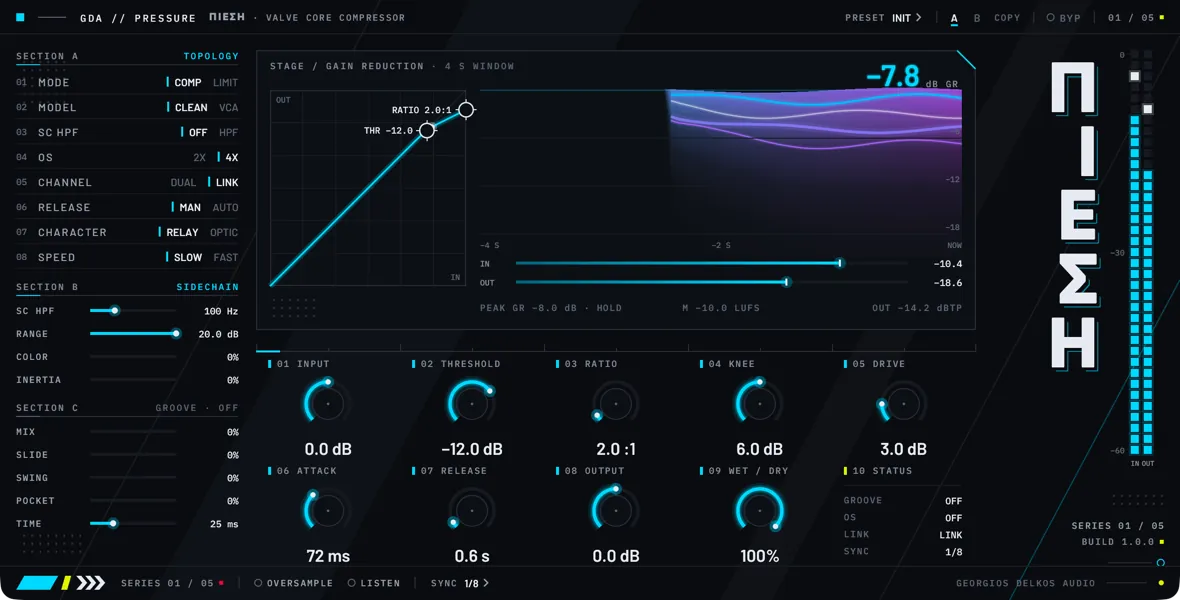
Pressure is a tube-voiced stereo compressor for the mix bus and the master. It is a feed-forward design with a soft knee: the detector reads the input, a gain computer works out how much to turn it down, and a valve-style saturation stage follows the gain reduction. It is built for a few decibels of glue on a full mix, and it can be pushed into audible, colored compression when a track calls for it.
Two switches set how the compressor moves, and they are independent of each other. Character chooses between Relay, a single release time, and Optic, a two-stage release that lengthens as the reduction deepens. Speed chooses between Slow, for bus and mastering times, and Fast, which shortens the attack to around a millisecond. Any of the four combinations is available.
Several controls apply a figure that differs from their setting: Ratio under the Clean model, Attack and Release with Speed at Fast, and Drive with Oversampling off. In each case the faceplate readout shows what is applied, while host automation and saved sessions keep the setting. Each control’s description says exactly what it applies.
The Groove section adds a second gain-reduction path whose timing can lag behind the beat (Slide), cycle with the host tempo (Swing) and adapt to where in the bar the compression falls (Pocket). It is off until Groove Mix is turned up.
Quick start
- Insert Pressure on the mix bus. If you expect to take Drive above about 6 dB, switch Oversampling on now, before you start playback: changing it later makes the host restart the plugin, which can interrupt the audio for a moment.
- Loop the loudest section of the song. Leave Character, Speed, and the Groove section as they open.
- Turn Threshold until the gain-reduction readout shows 2 to 3 dB on the loudest hits: down for more reduction, up for less. The mix should sound a little tighter without audibly dipping on each hit.
- Turn Ratio up until the loudest hits are held as firmly as you want, then go back to Threshold and return the gain reduction to 2 to 3 dB, since a higher ratio deepens it. Under the Clean model the part of the setting above 1:1 is halved (4 compresses at 2.5:1) and the readout shows the ratio in use; switch Model to VCA if you want Ratio applied as it reads.
- Set Attack by ear on the drums: lengthen it until the kick and snare keep their front edge, or shorten it if they poke out of the mix.
- Set Release so the ribbon, which shows the last four seconds of gain reduction, returns most of the way to zero before the next hit. Listen for the mix recovering in time with the song instead of pumping. If no single time suits the whole song, switch Auto Release on.
- If the kick or the bass makes the whole mix duck, switch Sidechain HPF on and raise Sidechain HPF Hz until the ducking stops. Switch Listen on to hear what the detector hears while you tune it, then switch Listen off.
- Turn Drive up for more density and harmonics, or down for a cleaner result. A make-up after the stage keeps the level close on a mix averaging around -18 dBFS; a hotter mix gets quieter as Drive goes up, so judge the tone and leave the loudness for the next step. With Oversampling off, the part of the setting above about 6 dB is held back.
- Turn Output until the level is the same with Bypass in and out, so that you compare tone and movement instead of loudness. Drive is already compensated, so what remains is the gain reduction and the rounding of the peaks, which usually means turning Output up.
- If the compression sounds right but there is too much of it, bring Mix down to blend the uncompressed mix back in.
- Read the status line on the stage: it shows the peak gain reduction, the momentary loudness, and the true peak of the output. The true-peak figure changes color above -1 dBTP.
Signal flow
- Input. The signal arrives and a copy is kept as the dry signal for Mix and Bypass.
- Input gain. Input is applied to the path that feeds the detector and the compressor.
- Sidechain filter. With Sidechain HPF on, the detector’s copy of the signal passes through the high-pass filter. Listen taps the signal here.
- Detector. A blend of peak and averaged level is measured, with timing set by Attack, Release, Speed, and Character. The detector reads the signal before gain reduction, never the output.
- Gain computer. Threshold, Knee, Ratio, Limit Mode, and Model turn the detected level into a gain-reduction target for each channel, capped by Range.
- Stereo link. With Stereo Link on, the larger of the two channels’ targets is used for both.
- Envelope. Attack, Release, Auto Release, and Inertia smooth the target into the gain reduction. With Groove Mix above zero, a second envelope shaped by Slide, Swing, and Pocket runs alongside, and Groove Mix blends the two.
- Gain reduction. The result is applied to the signal from step 2.
- Saturation. Drive, then Drive’s level make-up, then Analog Color. With Oversampling on, all three run at the higher sample rate.
- Mix. The processed signal is crossfaded with the dry copy from step 1, which is delayed to match when Oversampling is on.
- Output gain. Output is applied.
- Bypass. The Bypass crossfade is the last stage.
Meters
- IN reads the peak level of the signal as it arrives, before Input.
- The gain-reduction readout and the ribbon show the reduction applied at step 8, after Groove Mix. The status line holds its peak.
- OUT reads the peak level of the output.
- The loudness figure is momentary loudness (a 400 ms window, in LUFS) and the true-peak figure is in dBTP. Both are measured on the output, after Output and Bypass.
Controls
Top strip
- Choices
- Off, On
- Default
- Off
Takes the processing out and passes the input through, with a 10 ms crossfade so it can be automated without clicks. With Oversampling on, the bypassed signal stays in time with the processed one, so switching Bypass does not shift the audio against the rest of the session. When processing comes back in, gain reduction starts again from zero instead of resuming where it was. On the faceplate this is the BYP button in the top strip.
Topology
- Choices
- Off, On
- Default
- Off
Chooses the shape of the compression curve. Off is Compress: the ratio stays the same however far the signal goes over the threshold. On is Limit: the ratio starts at the Ratio setting at the threshold and rises to 20:1 over the first 12 dB above it.
Limit is a steeper curve for holding peaks down, not a brickwall limiter: the attack time still lets transients through and nothing fixes a ceiling. The faceplate labels the switch MODE, with the positions COMP and LIMIT.
- Choices
- Clean, VCA
- Default
- Clean
Decides how the Ratio setting is applied in Compress. With Limit Mode on, both models give the same curve.
Clean applies half of what Ratio shows above 1:1, so a setting of 4 compresses at 2.5:1. It is the gentler curve, for a mix bus or a master.
VCA applies Ratio as it reads, for a firmer grip.
- Choices
- Off, On
- Default
- Off
Puts a high-pass filter in front of the detector. The audio itself is not filtered, only what the compressor listens to. Turn it on when the kick or the bass is driving the gain reduction and the rest of the mix is ducking with it. Sidechain HPF Hz sets the cutoff. The faceplate labels the switch SC HPF.
- Choices
- 2x, 4x
- Default
- 4x
Chooses the rate the saturation stages run at when Oversampling is on; the faceplate labels it OS. It does not change the sound while Oversampling is off. The two rates add different amounts of latency, so changing this restarts the plugin in the same way as changing Oversampling.
2x runs Drive and Analog Color at twice the session sample rate, which can still leave audible aliasing once Drive goes above about 6 dB.
4x runs them at four times the session rate, which keeps aliasing down across the whole Drive range and costs more CPU.
- Choices
- Off, On
- Default
- On
On, both channels receive the same gain reduction, the larger of what the left and the right would each get, so the stereo image does not move when one side is louder. Off, each channel is compressed from its own level, which can shift the image. The faceplate labels the switch CHANNEL, with the positions LINK and DUAL.
- Choices
- Off, On
- Default
- Off
Off, the Release control sets the release time. On, the release time follows the depth of gain reduction from moment to moment: light reduction recovers quickly and deep reduction recovers slowly. Use it on material whose density changes a lot, where one fixed time either pumps in the loud parts or drags in the quiet ones.
Release still scales both ends: the quick end is a quarter of the release time in use (the Release setting, or 0.3 times it with Speed at Fast), kept between 50 and 200 ms, and the slow end is one and a half times that time, kept between 300 ms and 4 s. The faceplate labels the switch RELEASE, with the positions MAN and AUTO, and the Release readout shows AUTO while it is on.
- Choices
- Off, On
- Default
- Off
Chooses how the detector lets go of a signal. Off is Relay: one release time, set by Release. On is Optic: once gain reduction begins, the detector releases in two stages mixed equally, a quick one of about 60 ms and a slow one between 0.5 and 5 s that lengthens as the reduction deepens.
Optic recovers quickly at first and then holds a long tail, longer after deep reduction than after light. Until the first gain reduction it behaves exactly as Relay does, and in both positions Release still sets how the gain itself recovers.
- Choices
- Off, On
- Default
- Off
Off is Slow: Attack and Release run at the times they show. On is Fast: the attack runs at 0.012 times the time shown, so 100 ms becomes 1.2 ms, and the release at 0.3 times. The detector's averaging window shortens by the same factor as the attack, so it responds to individual peaks instead of the average level.
Use Fast to catch transients, Slow for bus and mastering work. Host automation and saved sessions always hold the Slow times; the faceplate readouts for Attack and Release show the applied times while Fast is on (the Release readout shows AUTO while Auto Release is on).
Sidechain
- Range
- 20 to 300 Hz
- Default
- 100 Hz
The cutoff of the detector's high-pass filter. It only has an effect while Sidechain HPF is on. The filter is a gentle one, 6 dB per octave, so it reduces how much the low end drives the compressor without removing it from the detector altogether. Raise it until the kick stops pulling the mix down, and use Listen to hear what the detector is left with. The faceplate labels it SC HPF, the same as the switch.
- Range
- 0 to 20 dB
- Default
- 20 dB
The most gain reduction the compressor will ask for. Lower it to stop loud sections from being pulled down further than you want while the threshold and ratio keep working below that point. At zero there is no gain reduction.
The depth-dependent release behaviors (the stretch described for Release, Auto Release, and Optic) measure depth as a fraction of Range, so lowering it also makes them lengthen sooner.
- Range
- 0 to 100%
- Default
- 0%
Blends in a second saturation stage after Drive; at zero the stage is out of the path. It is asymmetric, so it adds even-order harmonics next to the odd-order ones Drive produces, and it changes level as well as tone: quiet material comes up and peaks are rounded off. Drive's make-up does not correct for this.
While it is above zero, a 20 Hz high-pass on the processed signal removes the DC offset an asymmetric stage creates. When Oversampling is on, this stage is oversampled together with Drive. The faceplate labels it COLOR.
- Range
- 0 to 100%
- Default
- 0%
Gives the gain reduction momentum. Above zero it overshoots its target and swings back before settling, like a heavy meter needle at low settings and an audible pump at high ones, at a speed that follows Attack and Release.
Any setting above zero also slows the envelope, by about a factor of two just above zero, so there is a step in feel as you leave zero. The swing back never raises the gain above unity. Because of the overshoot, the gain-reduction meter can read past Range for a moment.
Groove
- Range
- 0 to 100%
- Default
- 0%
Blends between the straight gain reduction and the grooved one that Slide, Swing, and Pocket shape. At zero those controls do nothing and the Groove section header on the faceplate shows that the section is off, so turn this up first.
It blends two gain-reduction curves, not two audio signals, so no uncompressed signal is added; for parallel compression use Mix. The faceplate labels this control MIX inside the Groove section.
- Range
- 0 to 100%
- Default
- 0%
Makes the grooved gain reduction follow a slower, delayed copy of what the compressor is asking for. At zero it tracks without delay; at full it follows the delayed copy alone. The compression lands late, so more of the front of each hit gets through and the reduction carries on into the gap after it. Slide Time sets the delay. It is heard only as far as Groove Mix is turned up.
- Range
- 0 to 100%
- Default
- 0%
Makes the grooved release time rise and fall in a cycle locked to the host tempo. The release is shortest at the start of each Swing Sync division and longest halfway through it. At full it moves between a tenth of the release time and twice the release time.
Swing needs the host to be playing and to supply a tempo; while the transport is stopped it has no effect. It is heard only as far as Groove Mix is turned up.
- Range
- 0 to 100%
- Default
- 0%
Learns where in the bar gain reduction keeps happening, then holds the grooved release a little longer at those points and lets it recover a little faster between them. The effect is small by design: at full it moves the release time by about a tenth either way. It builds up over the first several bars of playback.
Pocket follows the host's bar position, so it needs the transport running with a tempo, and it takes the bar length from the host's time signature. It is heard only as far as Groove Mix is turned up.
- Range
- 5 to 80 ms
- Default
- 25 ms
How far behind the delayed copy used by Slide sits. It is a fixed time, not synced to tempo. Short times keep the lag subtle; long times make the compression land audibly late. It has no effect while Slide is at zero, and the faceplate labels it TIME.
Main controls
- Range
- -24 to 24 dB
- Default
- 0 dB
Gain before the compressor and its detector. Raising it pushes more signal over the threshold, so it deepens the compression as well as raising the level into Drive. The dry side of Mix is taken before this control, so Input does not change the level of the uncompressed signal you blend back in. The IN meter also reads before it.
- Range
- -40 to 0 dB
- Default
- -12 dB
The level above which the compressor reduces gain. The detector reads a blend of peak and averaged level, so a signal usually has to peak somewhat above the Threshold setting before reduction begins. Knee works the other way: above zero, it starts the compression below the threshold and eases it in.
- Range
- 1:1 to 20:1
- Default
- 2:1
How strongly the signal above the threshold is reduced. What is applied depends on Model and Limit Mode.
With the Clean model in Compress, half of the setting above 1:1 is applied, so 4 compresses at 2.5:1; with the VCA model the setting is applied as it reads. With Limit Mode on, the ratio starts at the setting and rises to 20:1 over the first 12 dB above the threshold.
The readout and the curve on the faceplate show the ratio that is applied, while host automation and saved sessions hold the control value.
- Range
- 0 to 12 dB
- Default
- 6 dB
The width of the transition around the threshold. At zero the curve has a hard corner. Wider settings start the compression half the knee width below the threshold and reach the full ratio half the width above it, for a less obvious onset.
- Range
- 0 to 18 dB
- Default
- 3 dB
Gain into the valve-style saturation stage that follows the compressor. A make-up gain after the stage takes the added level back out, so Drive changes the density more than the loudness. The stage does not feed the detector, so Drive does not change the gain reduction.
The make-up is set for a signal that reaches the stage peaking at -18 dBFS, which leaves at the level it has at zero. Quieter material comes up slightly, by a little over 2 dB at most, at the top of the range with Oversampling on. Louder material comes down, by more the higher the setting: at 6 dB, peaks at full scale leave the stage nearly 4 dB lower than they do at zero, and at the top of the range with Oversampling on, about 13 dB lower.
With Oversampling off, the part of the setting above 6 dB is held back progressively and never reaches 12 dB, to keep aliasing down (a setting of 12 dB runs at about 10.6 dB), and the faceplate readout shows the drive that is applied; with Oversampling on, the setting is applied as it reads. The make-up follows the drive that is applied, so for material averaging around -18 dBFS, switching Oversampling moves the level by less than 1 dB. Hotter material steps further once the setting is above 6 dB: at the top of the range, peaks at full scale come out about 4.5 dB lower with Oversampling on than with it off.
The stage is always in the processed path: at zero it adds no gain and the make-up does nothing, but it still rounds off peaks that approach full scale.
- Range
- 25 to 165 ms
- Default
- 72.5 ms
How quickly gain reduction builds when the signal goes over the threshold. With Speed at Slow, the setting is close to the measured time the reduction takes to cover 63 percent of the way to its target. Longer times let transients through before the compressor closes; shorter times hold them down.
With Speed at Fast the attack runs at 0.012 times the setting, and the faceplate readout shows that time.
- Range
- 0.2 to 8 s
- Default
- 0.6 s
How quickly the gain recovers once the signal falls. This is the base time: deep gain reduction stretches it, up to two and a half times when the reduction reaches Range, so heavy compression recovers more slowly than light compression.
With Speed at Fast the release runs at 0.3 times the setting, and the faceplate readout shows that time. Auto Release replaces the fixed time with one that follows the depth of reduction.
- Range
- -24 to 24 dB
- Default
- 0 dB
Gain after Mix, the last stage of the processed path; only Bypass follows it. Use it to match the processed level to the bypassed level so that you compare tone and movement instead of loudness. Drive has its own make-up, so Output mainly makes up for the gain reduction: expect to turn it up as the compression deepens. Analog Color pushes the other way on quiet material.
- Range
- 0 to 100%
- Default
- 100%
A linear crossfade between the unprocessed input and the compressed signal, for parallel compression. The dry side is the input as it arrives, before Input. When Oversampling is on, the dry side is delayed to match the processed side, so blending the two does not comb-filter. The faceplate labels it WET / DRY.
Footer
- Choices
- Off, On
- Default
- Off
Runs Drive and Analog Color at a higher sample rate to reduce aliasing, at the rate OS Quality chooses; the faceplate labels the switch OVERSAMPLE. With it on, Drive is applied in full across its range.
Oversampling adds latency, which Pressure reports to the host. The figure is fixed while the plugin is running, so when you change this switch or OS Quality, Pressure asks the host to restart it and report the new figure, which can interrupt the audio for a moment. Choose the setting before you start a pass.
- Choices
- Off, On
- Default
- Off
Replaces the output with the signal the detector hears: the input after Input and, when Sidechain HPF is on, after the high-pass filter. Saturation, Mix, and Output are skipped, so the level can differ from the normal output. Use it to tune Sidechain HPF Hz, and switch it off before you print.
- Choices
- 1/8, 1/8T, 1/16, 1/16T
- Default
- 1/8
The note value of one Swing cycle. It affects Swing only, and the faceplate labels it SYNC.
1/8 runs one cycle per eighth note.
1/8T runs one cycle per eighth-note triplet.
1/16 runs one cycle per sixteenth note.
1/16T runs one cycle per sixteenth-note triplet.